
Problem: Where and why should one create an __init__.py file?
Solution: Inside a folder/directory that’s meant to be a Python package containing a bunch of Python modules with useful functions, etc. that other Python scripts would be importing from (not strictly necessary as Python \(3.3+\) but still conventional to include).
- It executes the first time any module from that package is imported, thus providing a convenient place to run setup code.
- Expose functions/classes in internal submodules within the package directly at the package level, simplifying user API.
- Defining what gets imported when using wildcard import *.
Problem: (based on this YouTube video) Write some basic Python code to demonstrate how the object-oriented programming (OOP) paradigm works. In particular, show how to create a class, how to initialize attributes of object instances of the class, how to define methods associated to object instances of the class, how child classes can inherit properties of parent classes, and how classes themselves (not just their object instances) can also have class attributes and class methods or static methods.
Solution:
class Dog:
    def __init__(self, name, age): # attributes of Dog class
        self.dog_name = name
        self.years_old = age
    def add_one(self, x): # method in class
        return x + 1
    def bark(self): # method in class
        print("woof!")
    def get_name(self):
        return self.dog_name
    def get_age(self):
        return self.years_old
    def set_age(self, age):
        self.years_old = age
doggie = Dog("wolly", 44)
print(doggie.dog_name)
print(doggie.years_old)
print(doggie.add_one(4))
print(doggie.bark())
print(doggie.get_name())
print(doggie.get_age())
print(doggie.set_age(22))
print(doggie.years_old)
wolly
44
5
woof!
None
wolly
44
None
22
class Student:
    def __init__(self, name, age, grade):
        self.name = name
        self.age = age
        self.grade = grade

    def get_grade(self):
        return self.grade

class Course:
    def __init__(self, name, max_students):
        self.name = name
        self.max_students = max_students
        self.students = []

    def enroll_student(self, student):
        if len(self.students) < self.max_students:
            self.students.append(student)
            return True
        return False

    def get_average_grade(self):
        sum = 0
        for student in self.students:
            sum += student.get_grade()
        return sum / len(self.students)

s1 = Student("Tim", 19, 95)
s2 = Student("Bill", 19, 75)
s3 = Student("Jill", 19, 65)

c1 = Course("Science", 2)
c1.enroll_student(s1)
c1.enroll_student(s2)
print(c1.enroll_student(s3))
print(c1.students)
print(c1.students[0].name)
print(c1.get_average_grade())
False
[<__main__.Student object at 0x7fab84531870>, <__main__.Student object at 0x7fab84532a70>]
Tim
85.0
# Example of inheritance
class Pet: #parent class
    def __init__(self, name, age):
        self.name = name
        self.age = age

    def show(self):
        print(f"My name is {self.name} and I'm {self.age} years old.")

    def speak(self):
        print("I don't know what to say")

class Cat(Pet): #child class inherits parent class
    def __init__(self, name, age, color):
        super().__init__(name, age) # reference the super class, aka Pet parent class, view __init__(name, age) as going together
        self.color = color
    def speak(self):
        print("Meow")

    def show(self):
        print(f"My name is {self.name} and I'm {self.age} years old and my color is {self.color}")

class Dog(Pet): #child class inherits parent class
    def speak(self):
        print("Bark")

class Fish(Pet):
    pass

p = Pet("Tim", 19)
p.show()
c = Cat("Bill", 38, "Brown")
c.show()
d = Dog("Jill", 25)
d.show()
f = Fish("Bubbles", 29)
f.show()
print("---")
p.speak()
c.speak()
d.speak()
f.speak()
My name is Tim and I'm 19 years old.
My name is Bill and I'm 38 years old and my color is Brown
My name is Jill and I'm 25 years old.
My name is Bubbles and I'm 29 years old.
---
I don't know what to say
Meow
Bark
I don't know what to say
# Class attributes/methods vs. Instance attributes/methods
class Person:
    number_of_people = 0 # class attribute (defined w/o using self, thus not specific to an instance of the class)
    # class attributes would be preferred over just a simple global variable because the class is portable, and so
    # the value of any class attributes would come along for the ride whenever the class is imported into another file

    def __init__(self, name):
        self.name = name
        Person.add_person()

    @classmethod # decorator
    def number_of_people_(cls): # class method (again, it's for the whole class, not just a specific instance/object of the class)
        return cls.number_of_people

    @classmethod
    def add_person(cls):
        cls.number_of_people += 1

p1 = Person("Tim")
print(Person.number_of_people)
p2 = Person("Jill")
print(p1.number_of_people)
print(p2.number_of_people)
print(Person.number_of_people)
Person.number_of_people = 8
print(p1.number_of_people)
print(p2.number_of_people)
print(Person.number_of_people_())
1
2
2
2
8
8
8
# Static methods
class Math:

    @staticmethod # decorator which is unchanging, no access to an instance hence don't change anything
    def add5(x):
        return x + 5

    @staticmethod # they're basically just regular functions that happen to sit in a class for organizational purposes
    def add10(x):
        return x + 10

    @staticmethod
    def pr():
        print("Run!")

print(Math.add5(8))
print(Math.add10(4))
Math.pr()
13
14
Run!
Problem: Explain the purpose of magic methods in OOP Python, and write some code to demonstrate their applications.
Solution: Basically if you want to emulate the behavior of a lot of Python’s built-in classes like being able to concatenate strings using + or getting the length of a list using len(), but with your own classes rather than Python’s built-in classes, then magic methods are the way to go. Another way to put it is that you want to have access to this power of being able to do “operator overload”, so e.g. + is able to mean different things for adding two integers vs. two strings, because in all cases the + is just syntactic sugar for an underlying __add__ magic method that’s defined separately for the int class and the string class.
str1 = "Hello"
str2 = "World"
# The + symbol is syntactic sugar that actually calls the __add__ magic method in the class String
print(str1 + str2)
# To prove that, look at:
print(str1.__add__(str2))
# Or:
int1 = 1
int2 = 2
print(int1 + int2)
print(int1.__add__(int2))
# Similarly for the len function:
print(len(str2))
print(str2.__len__())
HelloWorld
HelloWorld
3
3
5
5
class Counter:
    def __init__(self):
        self.value = 42

    def count_up(self):
        self.value += 1

    def count_down(self):
        self.value -= 1

    def __str__(self):
        return f"Counter value is currently at {self.value}"

    def __add__(self, other): #other is always right-side operand (thing coming after the +)
        if isinstance(other, Counter):
            return self.value + other.value
        else:
            raise Exception("TypeError")

count1 = Counter()
count2 = Counter()
print(count1)
print(count2)
# the print function is implicitly going to call the __str__ magic method in the class
print(str(count1))
print(str(count2))
print("---")
print(count1.__str__())
print(count2.__str__())
count1.count_up()
count2.count_down()
print(count1)
print(count2)
print("---")
# because implemented __add__ magic method
print(count1 + count2)
print(count1.__add__(count2))
print(32 + count1)
Counter value is currently at 42
Counter value is currently at 42
Counter value is currently at 42
Counter value is currently at 42
---
Counter value is currently at 42
Counter value is currently at 42
Counter value is currently at 43
Counter value is currently at 41
---
84
84
---------------------------------------------------------------------------
TypeError                                 Traceback (most recent call last)
Cell In[25], line 38
     36 print(count1 + count2)
     37 print(count1.__add__(count2))
---> 38 print(32 + count1)

TypeError: unsupported operand type(s) for +: 'int' and 'Counter'
# Anytime one is writing a Python class, it's almost always a good idea to include __str__ and __repr__ magic methods
# in the class

class Car:
    def __init__(self, make, model, year):
        self.make = make
        self.model = model
        self.year = year

    def __str__(self):
        return f"{self.year} {self.make} {self.model}"

    def __repr__(self): # stands for "representation"
        return f"Car(make='{self.make}', model='{self.model}', year={self.year})"
        # this is the standard way to write a __repr__ method, namely "Class(attributes)"
my_car = Car("Toyota", "Corolla", 2021)

print(str(my_car))
print(repr(my_car))
2021 Toyota Corolla
Car(make='Toyota', model='Corolla', year=2021)
class InventoryItem:
    """
    A class to demonstrate operator overloading
    """
    def __init__(self, name, quantity):
        self.name = name
        self.quantity = quantity

    def __repr__(self):
        return f"InventoryItem(name='{self.name}', quantity='{self.quantity}')"

    # Arithmetic operators
    def __add__(self, other):
        if isinstance(other, InventoryItem) and self.name == other.name:
            return InventoryItem(self.name, self.quantity + other.quantity) # or other.name
        raise ValueError("Cannot add iterms with different names")

    def __sub__(self, other):
        if isinstance(other, InventoryItem) and self.name == other.name:
            if self.quantity >= other.quantity:
                return InventoryItem(self.name, self.quantity - other.quantity)
            raise ValueError("Cannot subtract more than the available quantity.")
        raise ValueError("Cannot subtract items of different types.")

    def __mul__(self, factor):
        if isinstance(factor, (int, float)):
            return InventoryItem(self.name, int(self.quantity * factor))
        raise ValueError("Factor must be an int or a float")

    def __truediv__(self, factor):
        if isinstance(factor, (int, float)) and factor != 0:
            return InventoryItem(self.name, self.quantity / factor)
        raise ValueError("Factor must be non-zero int or float")

    # Comparison operators:
    def __eq__(self, other):
        if isinstance(other, InventoryItem):
            return self.name == other.name and self.quantity == other.quantity
        raise ValueError("Cannot compare items of different types.")

    def __lt__(self, other):
        if isinstance(other, InventoryItem) and self.name == other.name:
            return self.quantity < other.quantity
        return ValueError("Cannot compare items of different types.")

    def __gt__(self, other):
        if isinstance(other, InventoryItem) and self.name == other.name:
            return self.quantity > other.quantity
        raise ValueError("Cannot compare items of different types.")

    def __ne__(self, other):
        return not (self == other) # uses the __eq__ magic method


item1 = InventoryItem("Apples", 80)
item2 = InventoryItem("Oranges", 20)
item3 = InventoryItem("Apples", 33)

print(item1 + item3)
print(item1 - item3)
print(item2 * 3)
print(item1 < item3)
print(item1 != item2)
InventoryItem(name='Apples', quantity='113')
InventoryItem(name='Apples', quantity='47')
InventoryItem(name='Oranges', quantity='60')
False
True
# more examples of magic methods with a singly linked list example
class Node:
    def __init__(self, value):
        self.value = value
        self.next = None

class LinkedList:
    def __init__(self):
        self.head = None
        self.size = 0

    def __len__(self):
        return self.size

    def __getitem__(self, index):
        if index < 0 or index >= self.size:
            raise IndexError("Index out of range.")
        current = self.head
        for _ in range(index):
            current = current.next
        return current.value

    def __setitem__(self, index, value):
        if index < 0 or index >= self.size:
            raise IndexError("Index out of range.")
        current = self.head
        for _ in range(index):
            current = current.next
        current.value = value

    def __delitem__(self, index):
        if index < 0 or index >= self.size:
            raise IndexError("Index out of range.")
        if index == 0:
            self.head = self.head.next
        else:
            current = self.head
            for _ in range(index-1):
                current = current.next
            current.next = current.next.next
        self.size -= 1

    def __contains__(self, value):
        current = self.head
        while current:
            if current.value == value:
                return True
            current = current.next
        return False

    def append(self, value): # not a magic method
        new_node = Node(value)
        if not self.head:
            self.head = new_node
        else:
            current = self.head
            while current.next:
                current = current.next
            current.next = new_node
        self.size += 1

    def __str__(self):
        values = []
        current = self.head
        while current:
            values.append(str(current.value))
            current = current.next
        return " -> ".join(values)

LL = LinkedList()
LL.append(10)
LL.append(20)
LL.append(30)
print(LL)
print(len(LL))
print(LL[2])
LL[0] = 22
print(LL)
del LL[1]
print(LL)
print(30 in LL)
10 -> 20 -> 30
3
30
22 -> 20 -> 30
22 -> 30
True
class DatabaseConnection:
    def __init__(self, db_name):
        self.db_name = db_name
        self.connected = False

    def __enter__(self):
        self.connected = True
        print(f"Connected to the database '{self.db_name}'.")
        return self

    def __exit__(self, exc_type, exc_value, traceback):
        self.connected = False
        print(f"Disconnected from the database '{self.db_name}'.")
        if exc_type:
            print(f"An exception occurred: {exc_value}")
        return True

with DatabaseConnection("ExampledDB") as db: # context manager
    print(f"Is connected? {db.connected}")
Connected to the database 'ExampledDB'.
Is connected? True
Disconnected from the database 'ExampledDB'.
class Countdown:
    def __init__(self, start):
        self.current = start

    def __iter__(self):
        return self

    def __next__(self):
        if self.current > 0:
            value = self.current
            self.current -= 1
            return value
        else:
            raise StopIteration

for number in Countdown(5):
    print(number)
5
4
3
2
1
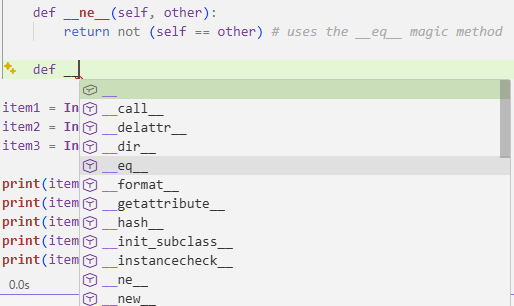
For more magic methods, you can starting type the double underscore, and see what VS Code IDE suggests:
Problem: Write Python code to demonstrate some applications of decorators, generators and context managers.
Solution: A decorator (@) is basically a wrapper function \(w\) that itself takes in some function \(f\) and maps it to a “wrapped” version \(w(f)\) of \(f\) with greater functionality but without cluttering the logic of \(f\) itself. A generator (yield) is also a function which is a bit like a discrete-time Markov chain. A context manager (with) guarantees that a program will exit even if there were errors during its execution.
# Decorators
def func(f):
    def wrapper():
        print("Started")
        f()
        print("Ended")

    return wrapper

def func2():
    print("I am func2")

def func3():
    print("I am func3")

x = func(func3)
y = func(func2)
print(x)
x()
y()
<function func.<locals>.wrapper at 0x7fa7335cb2e0>
Started
I am func3
Ended
Started
I am func2
Ended
func3 = func(func3) # not ideal to write this line of code :(
func2 = func(func2)
func3()
func2()
Started
I am func3
Ended
Started
I am func2
Ended
# Decorators are a solution
@func
def func3():
    print("I am func3")

func3()
func2()
# anytime want to create a Python decorator function, need to return the "wrapper"
Started
I am func3
Ended
Started
I am func2
Ended
# But suppose func2 had an argument x
@func
def func2(x):
    print(x)

func2(3)
---------------------------------------------------------------------------
TypeError                                 Traceback (most recent call last)
Cell In[4], line 6
      2 @func
      3 def func2(x):
      4     print(x)
----> 6 func2(3)

TypeError: func.<locals>.wrapper() takes 0 positional arguments but 1 was given
# One could just redefine wrapper() to be wrapper(x):
def func(f):
    def wrapper(x):
        print("Started")
        f(x)
        print("Ended")
    return wrapper

@func
def func2(x):
    print(x)

func2(4)
Started
4
Ended
# But then this throws an error for func3 which currently takes no arguments:
@func
def func3():
    print("I am func3")

func3()
---------------------------------------------------------------------------
TypeError                                 Traceback (most recent call last)
Cell In[6], line 6
      2 @func
      3 def func3():
      4     print("I am func3")
----> 6 func3()

TypeError: func.<locals>.wrapper() missing 1 required positional argument: 'x'
# Solution is to use an unpack operator *:
def func(f):
    def wrapper(*args, **kwargs): # within the function scope, args is a tuple and kwargs is a dictionary
        print("Started")
        rv = f(*args, **kwargs)
        print("Ended")
        return rv
    return wrapper

@func
def func2(x, y):
    print(x)
    return y

@func
def func3():
    print("hey")

x = func2(5, 6)
print(x)
Started
5
Ended
6
import time

def timer(func):
    def wrapper(*args, **kwargs):
        start = time.time()
        rv = func()
        total = time.time() - start
        print("Time:", total)
        return rv
    return wrapper

@timer
def test():
    for _ in range(1000):
        pass

@timer
def test2():
    time.sleep(2)

test()
test2()
Time: 1.4781951904296875e-05
Time: 2.0021464824676514
# Generators
x = [n**2 for n in range(10000)]
for el in x:
    print(el)
# notice how in this application just want to print one value at a time
# the list is so large, all of RAM is being used!
0
1
4
9
...
99960004
99980001
class Gen:
    def __init__(self, n):
        self.n = n
        self.last = 0

    def __next__(self):
        return self.next()

    def next(self):
        if self.last == self.n:
            raise StopIteration()
        rv = self.last ** 2
        self.last += 1
        return rv

g = Gen(1000)

while True:
    try:
        print(next(g))
    except StopIteration:
        break
0
1
4
9
...
996004
998001
# However, Python has a simpler way to implement a generator function, namely via the yield keyword

def gen(n):
    for i in range(n):
        yield i**2 #yield = pause

g = gen(1000)
print(type(g))
for i in g:
    print(i)
<class 'generator'>
0
1
4
9
...
996004
998001
# Alternatively, can use the next method:
g = gen(1000)
print(next(g))
print(next(g))
print(next(g))
print(next(g))
0
1
4
9
# we can explicitly unravel the generator scope (previously a for loop) as a sequence of yield statements
def gen():
    yield 1
    yield 3
    yield 5

g = gen()
print(next(g))
print(next(g))
print(next(g))
print(next(g))
1
3
5
---------------------------------------------------------------------------
StopIteration                             Traceback (most recent call last)
Cell In[13], line 11
      9 print(next(g))
     10 print(next(g))
---> 11 print(next(g))

StopIteration:
# Comparison between lists and generator memory usage:
import sys

def gen(n):
    for i in range(n):
        yield i**2

x = [i ** 2 for i in range(10000)]
g = gen(10000)

print(sys.getsizeof(x))
print(sys.getsizeof(g))
85176
104
# Context managers
file = open("file.txt", "a")
try:
    file.write("hello")
finally:
    file.close()
# this code here is equivalent to the above code:
with open("file.txt", "a") as file:
    file.write("hello")
class File:
    def __init__(self, filename, method):
        self.file = open(filename, method)

    def __enter__(self):
        print("Enter")
        return self.file

    def __exit__(self, type, value, traceback):
        print(f"{type}, {value}, {traceback}")
        print("Exit")
        self.file.close()
        if type == Exception:
            return True # tell Python exception was gracefully handled, program doesn't need to crash anymore

with File("file.txt", "w") as f:
    print("Middle")
    f.write("hello!")
    raise FileExistsError()
Enter
Middle
<class 'FileExistsError'>, , <traceback object at 0x7fa7328df800>
Exit
---------------------------------------------------------------------------
FileExistsError                           Traceback (most recent call last)
Cell In[17], line 19
     17 print("Middle")
     18 f.write("hello!")
---> 19 raise FileExistsError()

FileExistsError:
from contextlib import contextmanager

@contextmanager # decorator
def file(filename, method):
    print("enter")
    file = open(filename, method)
    yield file # generator
    file.close()
    print("exit")

with file("text.txt", "w") as f:
    print("middle")
    f.write("hello")
enter
middle
exit